
 100% Quebec
Clic Horaire feature
Exceptional unlock and bank rewind
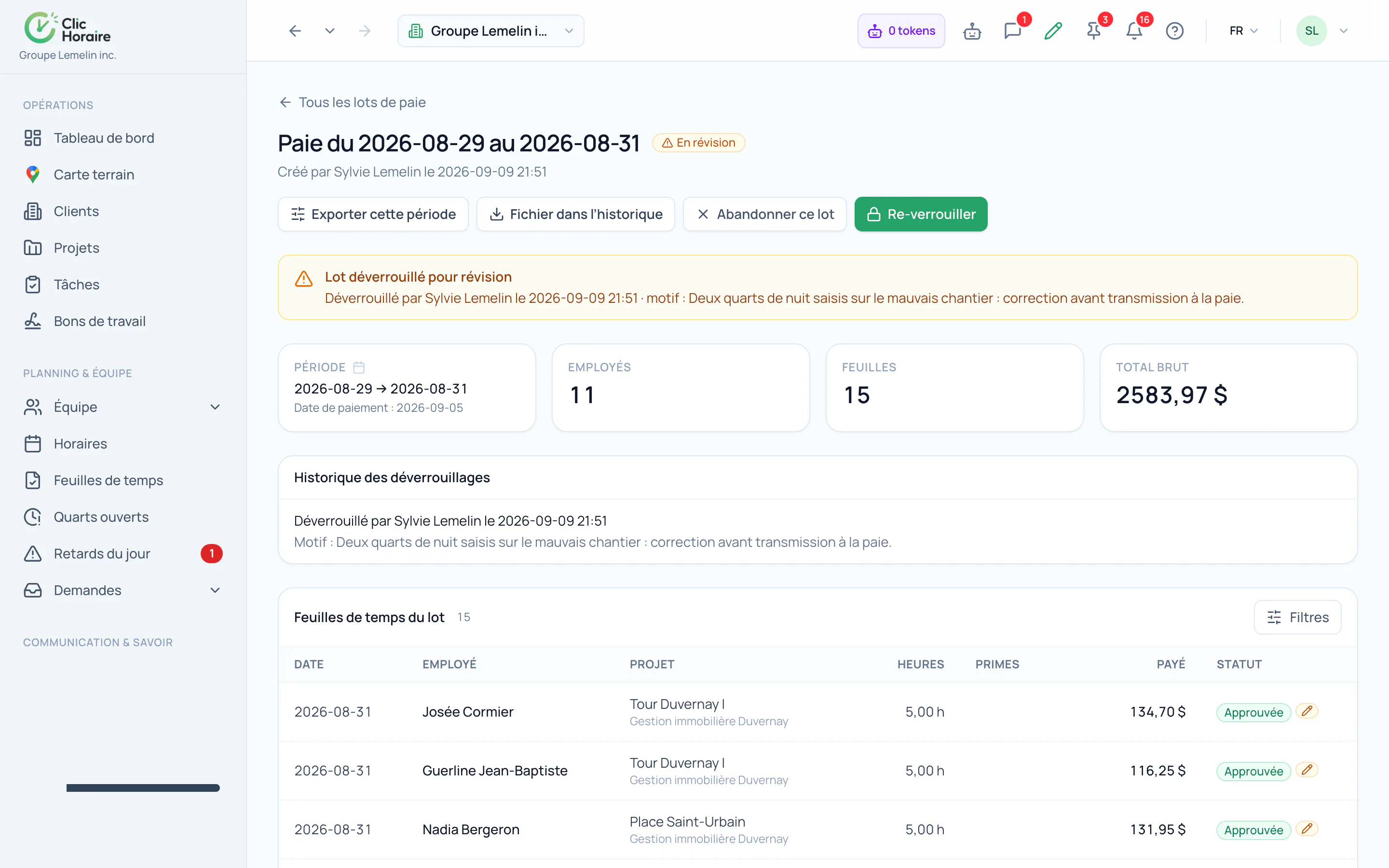
Correcting a locked period stays possible, but never silently: unlocking requires a mandatory reason, and the automatic bank rewind restores hour balances to exactly the state they were in before the run.
What's included
Mandatory reason recorded on every unlock
Automatic rewind of hour banks
Re-lock after correction, with no manual recalculation
How it works, in detail
- 1
The reason is not optional
Unlocking a period requires writing down why. The reason, the author and the time are recorded in the audit trail and stay attached to the run: the correction is possible, erasing its trace is not.
- 2
Banks rewind exactly
A locked run has already moved balances: overtime banked, sick time consumed, vacation accrued. Unlocking rewinds them to the state before the run, rather than leaving someone to catch up the difference by hand in a spreadsheet.
- 3
Re-lock, without recomputing everything
Once the correction is made, the run closes again and the banks replay on the corrected figures. The old run and the new one both stay in the history, which is what lets you explain a gap between two payrolls six months later.
 Clic Horaire
See this feature on your own data
14-day free trial, no credit card. Your decrees are configured up front: all you add is your crew.
See every feature