
 100% Quebec
Clic Horaire feature
Calendar view (month, week, day)
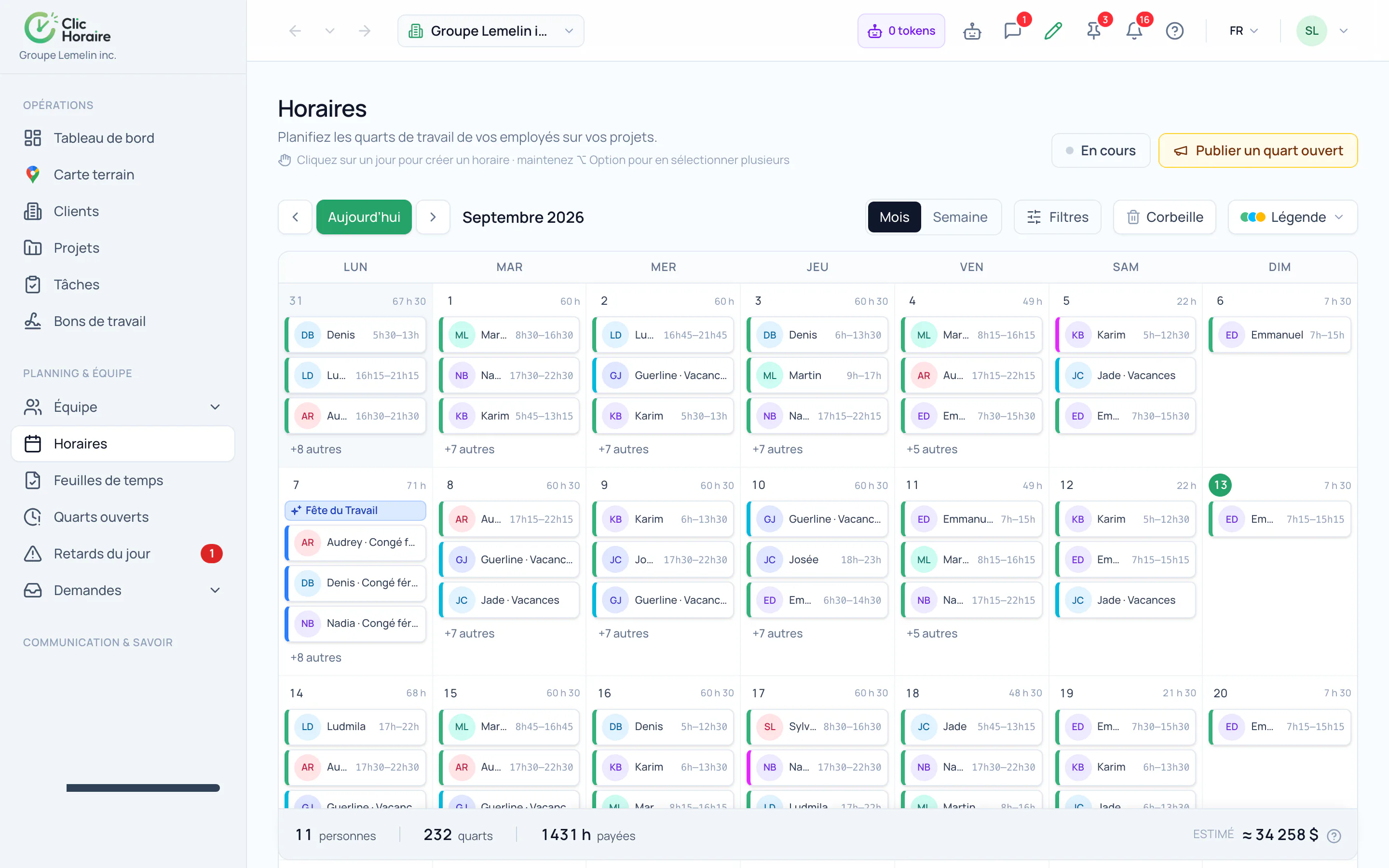
View all your schedules by month, week, or day in a single calendar, filterable by employee, team, or job site, to spot gaps or conflicts at a glance.
What's included
Month, week, and day views
Filters by employee, team, or job site
Spot schedule gaps at a glance
How it works, in detail
- 1
Three scales, one truth
The month to see coverage and gaps, the week to balance the load, the day to settle a detail. It is the same schedule shown three ways: you do not switch tools halfway through.
- 2
The month carries its totals
Under the calendar sit the number of people scheduled, the number of shifts, the hours to be paid and the estimated cost of the period. A schedule that drifts shows it while you are building it, not when the invoice lands.
- 3
Absences and holidays are in there too
Approved time off, decree holidays and open shifts still to be filled appear in the same grid as assigned shifts. A gap on a day off is not a gap: the calendar says so.
 Clic Horaire
See this feature on your own data
14-day free trial, no credit card. Your decrees are configured up front: all you add is your crew.
See every feature